
Building your site
Pages and sections
Every Kurato page is a stack of sections: a hero, a filmstrip, a quote, a closing call. Each of the 70 sections is both a block for the WordPress editor and a widget for Elementor, so you can use either editor.
Which editor to use#
- The block editor is part of WordPress. It needs no extra plugin and is fast.
- Elementor (the free version) lets you drag sections and see the page as you build it. The demo pages are built with it.
You can use both on one site, one editor per page. Each demo has a page named Built with blocks that shows the sections in the block editor.
Add a section in the block editor#
- Open a page, or go to Pages > Add New Page.
- Click the blue plus button at the top left to open the block list.
- Scroll to Kurato sections, or type the section name in the search field.
- Click a section to add it. Then fill it in from the sidebar on the right.
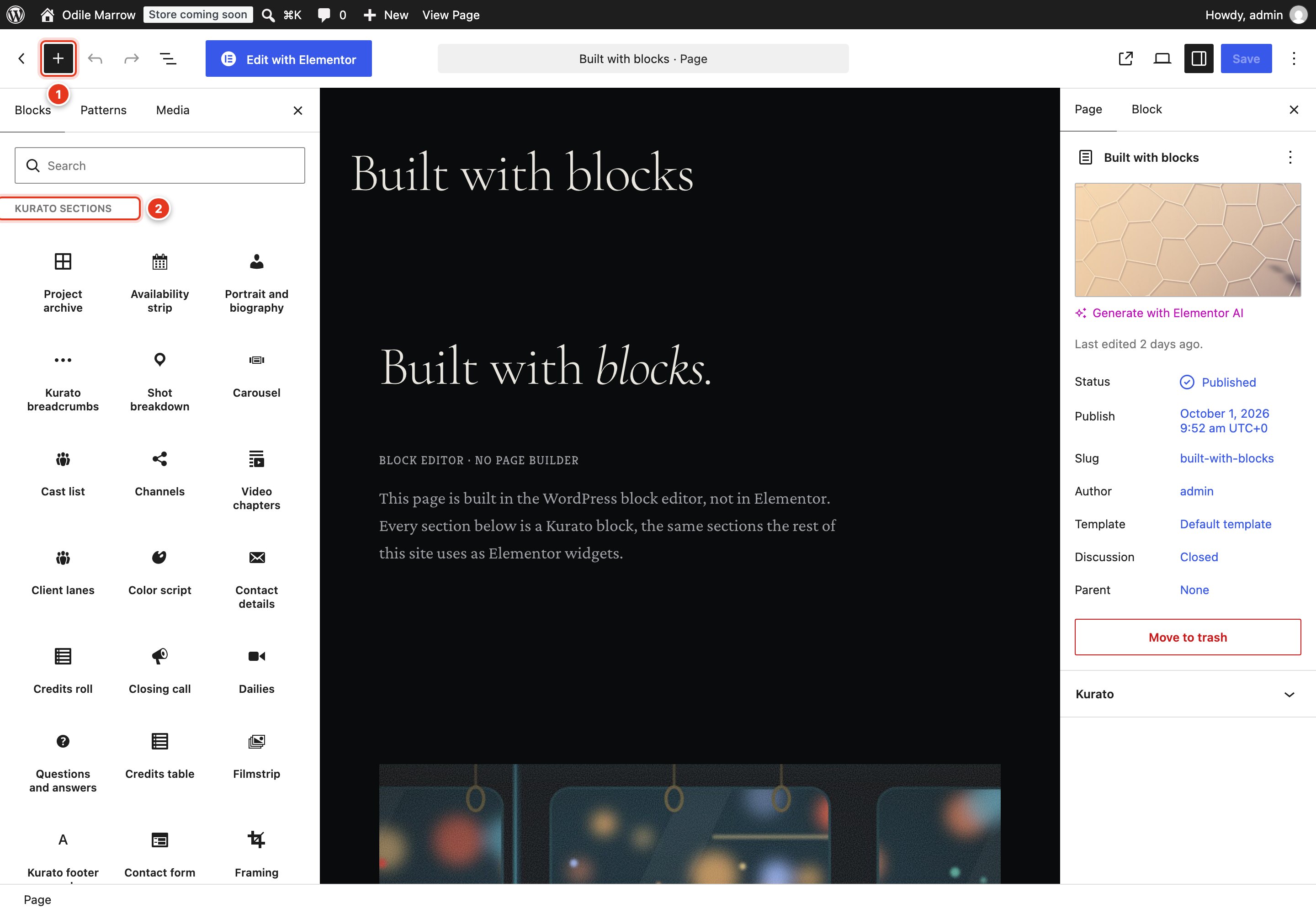
- The plus button opens the block list.
- The Kurato sections category.
A new section shows "Nothing to show yet" until you fill in its fields. Sections that list projects, posts, or products fill themselves from your content.
Add a section in Elementor#
- Open a page and click Edit with Elementor.
- In the panel on the left, type
kuratoin the search field, or scroll to the Kurato category. - Drag a section onto the page. Kurato makes the new container full width, so the section reaches the edges of the screen.
- Fill in the section in the panel on the left. Click Publish.
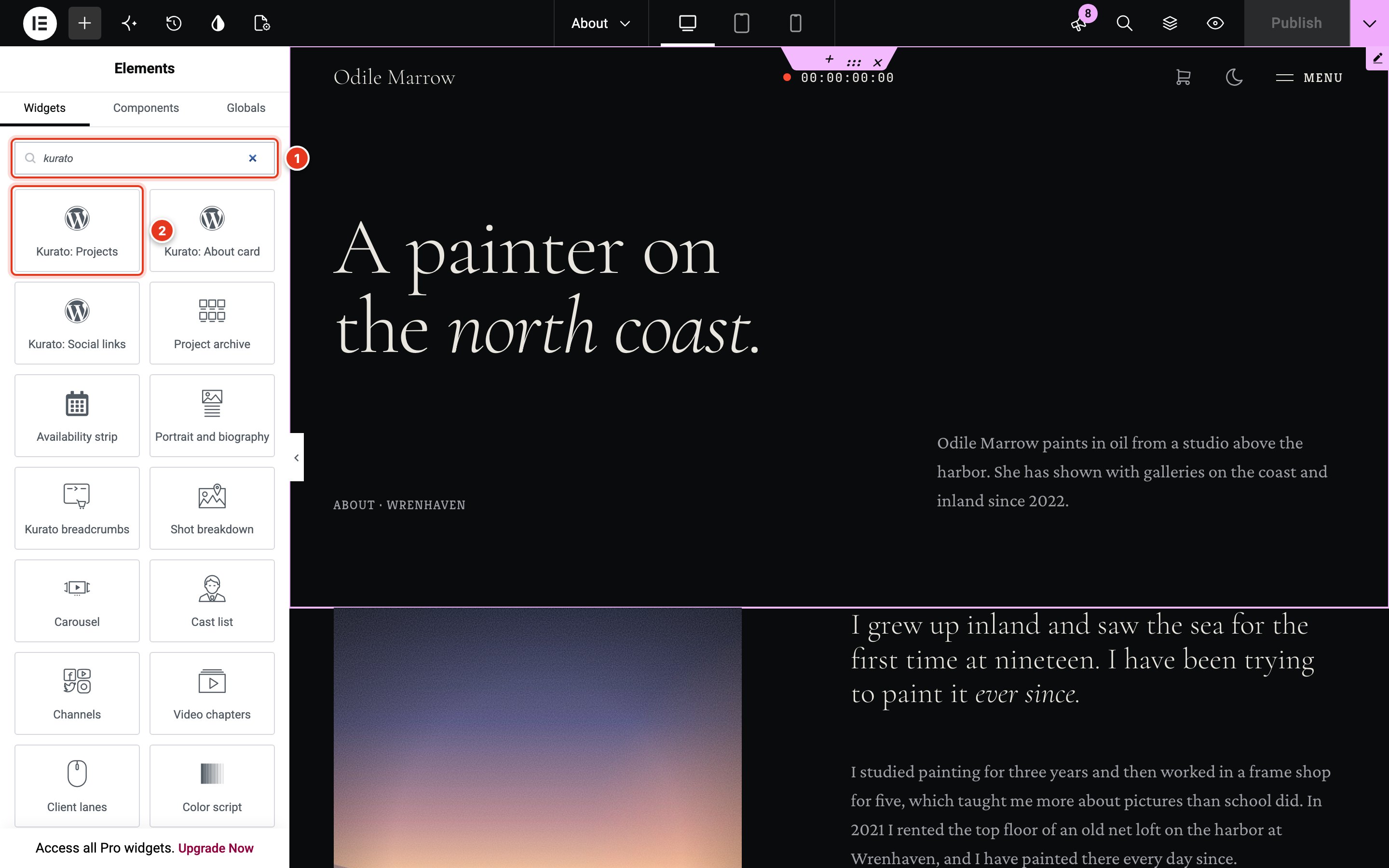
- Search for
kurato. - The Kurato sections. Drag one onto the page.
Kurato turns on Elementor's Disable Default Colors and Disable Default Fonts, so the theme's colors and fonts are used. The demo import also stops Elementor from loading Google fonts. Elementor's Hide Title page setting removes the theme's page title.
The 70 sections#
The same sections are in both editors, with the same fields.
Openers (8)#
The first screen of a page.
| Section | What it shows |
|---|---|
| A full-screen slideshow with a title card, a scrubbing timeline, and a scroll cue. | |
| A full-screen hero over a muted, looping background video, with a title, two links, and a pause control. | |
| A first screen built around one portrait: a large title split around the picture, a badge, a short intro, and two links. | |
| A full-screen still behind a letterbox with the title card over it. Reads the current project when you leave it empty. | |
| The title and intro that open an inner page, with the last word of the title in italic. | |
| A large opening statement with a list of facts and a link beneath it. | |
| One line of very large type running across the page, with a mark between the words. It follows the scroll. | |
| A release poster: tall key art with a tagline, a large title, the billing block, and a release line, alone or beside a synopsis. |
Projects (13)#
Sections that read your projects.
| Section | What it shows |
|---|---|
| Every project as a contact sheet, a shot list, or a grid, with filters and a layout switch. | |
| Selected projects on a horizontal strip, with a scrubber and chapter marks. | |
| A row of tall strips of stills; the one under the pointer or focus opens wide with its title. | |
| Project cards that pin and stack as the visitor scrolls, each one stepping back as the next arrives. | |
| One featured project as a wide card: still, title, subtitle, a few report facts, and a link. | |
| Rows of a still and copy that trade sides, joined by a numbered timeline. | |
| Stills held full screen while the page scrolls, cutting from one to the next behind a playhead. | |
| The full-bleed link to the next project, taken from the archive order. | |
| A filmography table: year, title, role, format, and runtime, from your projects or typed by hand. | |
| A film as a strip of colors, each with a label and a timecode. One continuous strip or a grid of swatches. | |
| A grid of short muted loops, each on its poster with a label and a running timecode. | |
| A contact strip of frames, one of them circled in grease pencil as the select. |
Text (11)#
| Section | What it shows |
|---|---|
| A large lead line with the body copy beside it, for the story behind a project. | |
| A long statement whose words light up as the visitor scrolls through it. | |
| One line said about the work, set large and centered, with its source under it. | |
| A heading over numbered habits, steps, or services, three to a row. | |
| A row of large figures, each with a label and a short note, that count up as they come into view. | |
| Content on reels: a row of tabs, each opening one panel of copy with a still and a link. | |
| Questions that open their answers, like the Q and A after a screening, with structured data for search engines. | |
| A scene set in real screenplay format on a page, with scene numbers in the margins. | |
| A chapter card drawn as a clapperboard: scene, roll, take, and a title. The sticks close as it comes into view. | |
| A career on a time track: dated entries hung off a ruler like clips in an edit, with a playhead that follows the scroll. | |
| An end-credits roll: roles against a center axis, with their names beside them. |
Images, video, and sound (12)#
| Section | What it shows |
|---|---|
| One framed image with a caption and a credit under it. The picture drifts as the page scrolls. | |
| A grid of frames that opens into the theme's lightbox. | |
| The slide projector: one large slide at a time with a tray of thumbnails, a counter, prev and next, keys, and swipe. | |
| Two overlapping prints with plate numbers, a note, and specification rows. | |
| One still with frame lines for the aspect ratios you choose. The visitor switches between them. | |
| Before and after the color grade, with a divider the visitor drags across the frame. | |
| One still with numbered markers. Each marker opens a note about the shot. | |
| Numbered storyboard panels, each with the shot size, the camera move marked on the frame, the action, and the length. | |
| A poster with a play button, a short piece of copy, and the screening room it opens. | |
| One video behind the theme's poster and play button, played in the screening room. | |
| One video beside its chapter list. A chapter starts the video at its time. | |
| An audio playlist with a cover: play, pause, and scrub each track on a timecode track. |
About you (10)#
| Section | What it shows |
|---|---|
| A tall portrait beside a lead paragraph, the body copy, and one link. | |
| The team as the cast of a film: portraits, names, roles, a line each, and links, as a list or as cards. | |
| Two lanes of client names that run against each other as the page scrolls. | |
| What clients said, each quote with a portrait, a name, a role, and a company mark, as cards, a row, or a stack. | |
| What the critics wrote, set like the quotes on a film poster: a pull line, a star rating, and the outlet. | |
| Awards and festival selections, each set inside a pair of laurel wreaths. | |
| Skills drawn as audio level meters, each with its value and a note. | |
| The gear list grouped by case, like the labeled flight cases of a camera department, each item with a note. | |
| Twelve months of booking availability, rolling forward from this month. | |
| A schedule as a Gantt chart: phases as bars across weeks, each with a note. |
Contact and business (11)#
| Section | What it shows |
|---|---|
| The aside of the contact page: short blocks of contact information beside the form. | |
| A Contact Form 7 form placed in the call-sheet layout, beside the contact details. | |
| The studio address and hours, with a map that loads only when the visitor asks for it, and a directions link. | |
| Social and contact channels as large rows: the network icon, the handle, a note or a follower count, and the link. | |
| An email sign-up band that sends to your mailing service, such as Mailchimp or Brevo, drawn with the theme's ruler field. | |
| Numbered service rows with deliverables, a starting price, and a link; a still follows the pointer across the list. | |
| A heading over up to four rate plans, each with a price, a feature list, and a button. | |
| Files to download, such as the press kit, stills, poster, and script, each with its format and size. | |
| A countdown to a date on a film leader, with a message once the date has passed. | |
| Dates, venues, and ticket links, sorted by date. A screening that has passed is marked as past on its own. | |
| The large closing link that ends a page, with a button and a second link. |
Shop and journal (2)#
| Section | What it shows |
|---|---|
| A grid of products, drawn with the shop's own cards. Needs WooCommerce. | |
| The latest posts from the journal, as a row of cards with a still, a meta line, and a title. |
Site parts (3)#
Built for the header and footer templates, and for page tops.
| Section | What it shows |
|---|---|
| The bar at the top of the page: logo, timecode, mode switch and menu button. Built for a header template. | |
| The large name that ends the page, inked in by the playhead. Built for a footer template. | |
| The trail from the front page to this one, read from the request. |
Patterns#
Patterns are ready-made groups of blocks. In the block editor, open the block list, click the Patterns tab, and choose Kurato. There are 11:
- Whole pages: Home, the reel; About, the biography; Contact, the call sheet; Journal, the notes; Work, the archive; and Project, the case study.
- Single sections: Closing call, Page head with a count line, Plates, two prints on a table, Pull quote, and Synopsis, a lead and its body copy.
The patterns need Kurato Core. Without it, they are not offered.
Page templates#
Choose a template in the sidebar of the block editor, under Template, or in Elementor's page settings.
| Template | Use it for |
|---|---|
| Default template | Normal pages. The page shows its title and text at reading width. A page that starts with a Kurato section is drawn full width on its own. |
| Canvas (full width) | Pages built from sections. The content runs from edge to edge, with the header and footer. |
| Blank (no header or footer) | Landing pages and "coming soon" pages. No header, no menu, and no footer. |
Options for one page#
Pages, posts, and projects have a Kurato panel in the block editor sidebar:
- Page runtime: how long this page "runs", in seconds, for the timecode in the header. Leave it at 0 to use the length set in the Customizer.
- Leave the header off this entry and Leave the footer off this entry: hide one of them on this page only.
Your own header and footer#
The theme draws its own header and footer. To design a different one in Elementor:
- Go to Projects > Header and Footer and click Add New.
- Give it a name. Under Where this template is used, choose Header or Footer, and tick where it applies.
- Save it, then click Edit with Elementor. Build it with any widgets. The Kurato HUD widget is the theme's header bar, and the Kurato footer reel widget is the large name at the end of the page.
- Publish it.
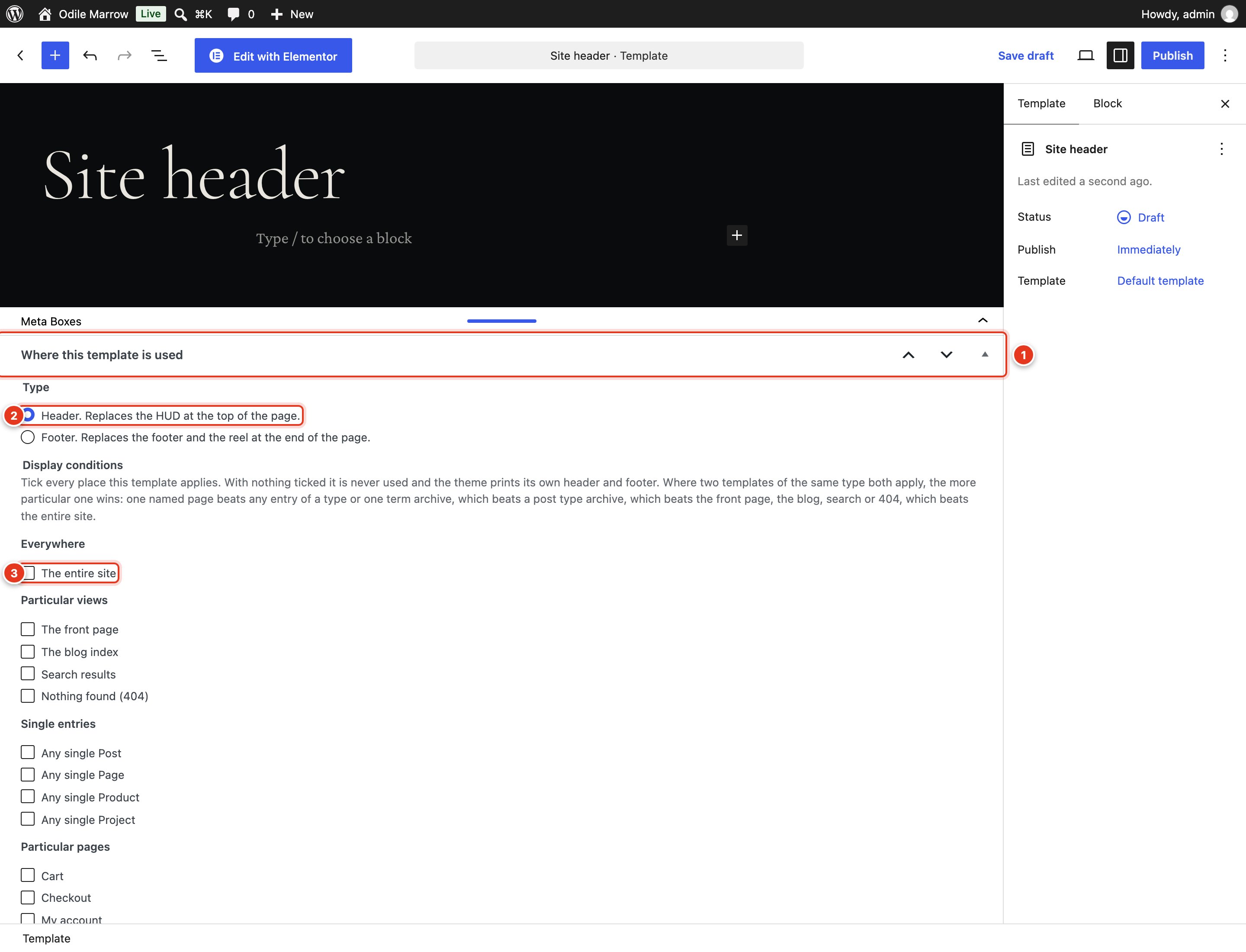
- The Where this template is used box. In the block editor, it is in the Meta Boxes area under the page. Drag the bar up to see it.
- The type: header or footer.
- The places it applies. The entire site covers every page.
When two templates match the same page, the more specific one wins: one named page beats any entry of a type or one term archive, which beats a post type archive, which beats the front page, the blog, search, or 404, which beat the entire site. With nothing ticked, a template is never used.
Image sizes#
Kurato crops images to film shapes. Upload images at least as large as these, and WordPress makes the crops for you:
| Used for | Shape | Upload at least |
|---|---|---|
| Hero slides, project stills, the post image, the next-scene link | 2.39:1, wide | 1920 by 803 pixels |
| Project cards, journal cards, video posters | 16:9 | 1280 by 720 pixels |
| Portraits | 4:5, tall | 1000 by 1250 pixels |
| Products | Any; cards are cropped to 16:9 | 1280 pixels wide |
Keep the subject near the middle of wide images. On phones, a hero crops the sides. For a project, set the Focal point to choose what stays in view. See Project details.
Kurato 1.0.0 documentation, updated 2026-10-03. Online at kurato.jawad.work/docs/.