
Building your site
Customizer settings
All of Kurato's options live in one place: Appearance > Customize > Kurato. You see each change in the preview before you publish it.
Open the Customizer#
Go to Appearance > Customize, or click Customize in the black bar at the top of your site.
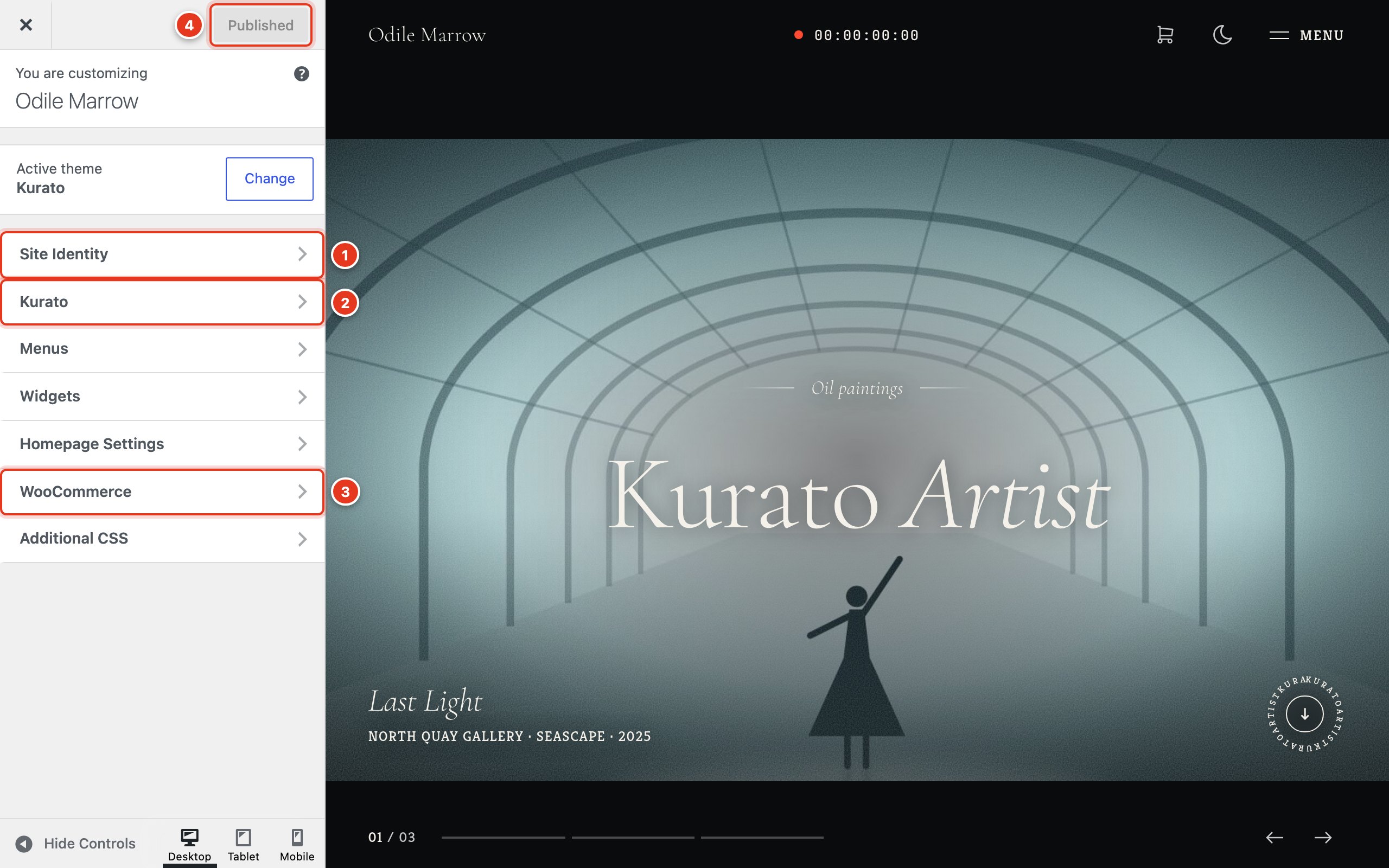
- Site Identity: logo, day logo, title, tagline, and site icon. See Logo and site icon.
- Kurato: every option this theme adds. The rest of this page goes through it.
- WooCommerce: the store notice, product catalog, and checkout options from WooCommerce itself.
- Click Publish to save. Nothing changes on your site until you do.
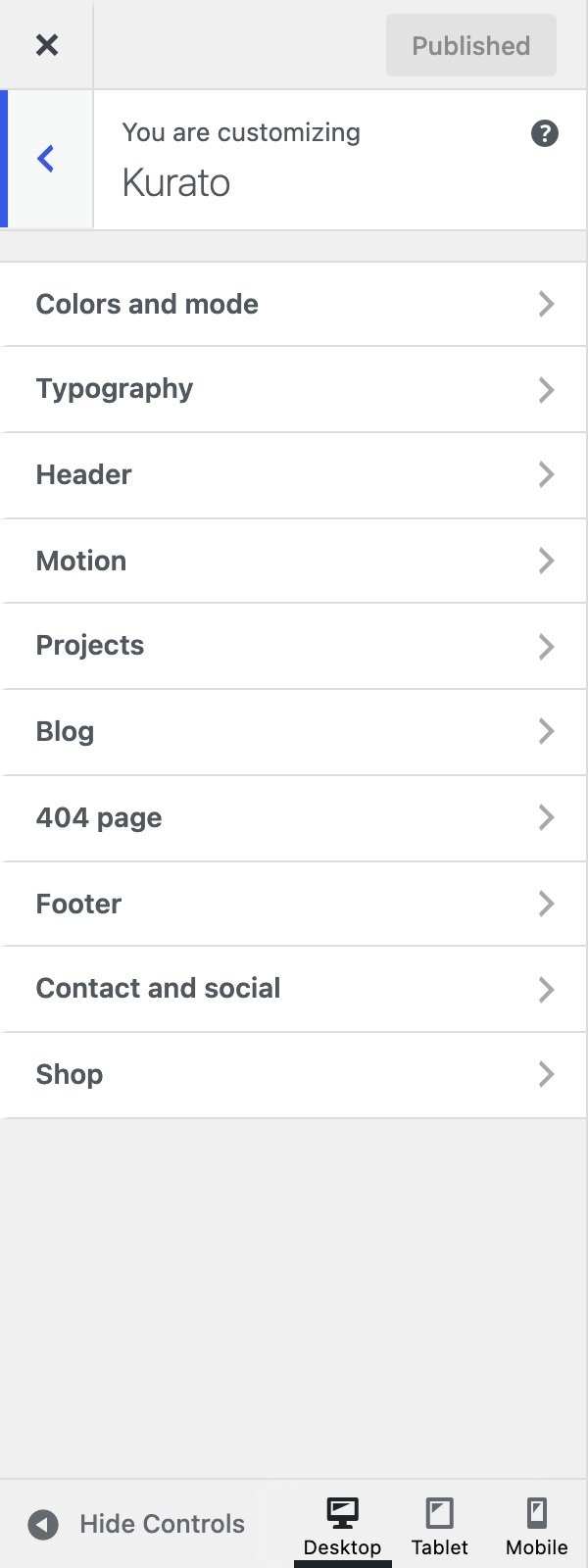
The Kurato panel has these sections:
- Colors and mode
- Typography
- Header
- Motion
- Projects
- Blog
- 404 page
- Footer
- Contact and social
- Shop, when WooCommerce is active
Colors and mode#
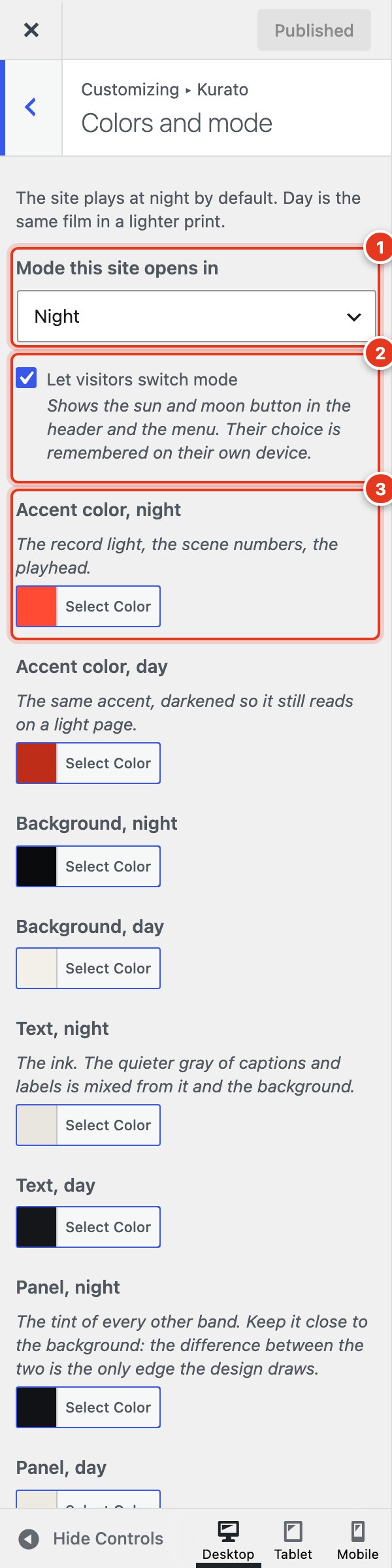
- The mode the site opens in.
- The day and night button for visitors.
- The accent color, one for each mode.
Kurato has two modes. Night is dark, and day is the same design in a light print. Each mode has its own colors.
| Setting | What it does | Default |
|---|---|---|
| Mode this site opens in | Night, Day, or Follow the visitor's system (the light or dark setting of the visitor's device). | Night |
| Let visitors switch mode | Shows the sun and moon button in the header and the menu. The visitor's choice is remembered on their device. | On |
| Accent color, night | The red of the record light, the scene numbers, and the playhead. | #FF4B33 |
| Accent color, day | The same accent, darker, so it reads on a light page. | #BE2D17 |
| Background, night and day | The page color in each mode. | #0A0B0D and #F3F0EA |
| Text, night and day | The text color. The gray of captions and labels is mixed from the text and the background. | #E9E6DF and #15161A |
| Panel, night and day | The color of every other band on a page. Keep it close to the background. | #101215 and #EDEAE2 |
Typography#
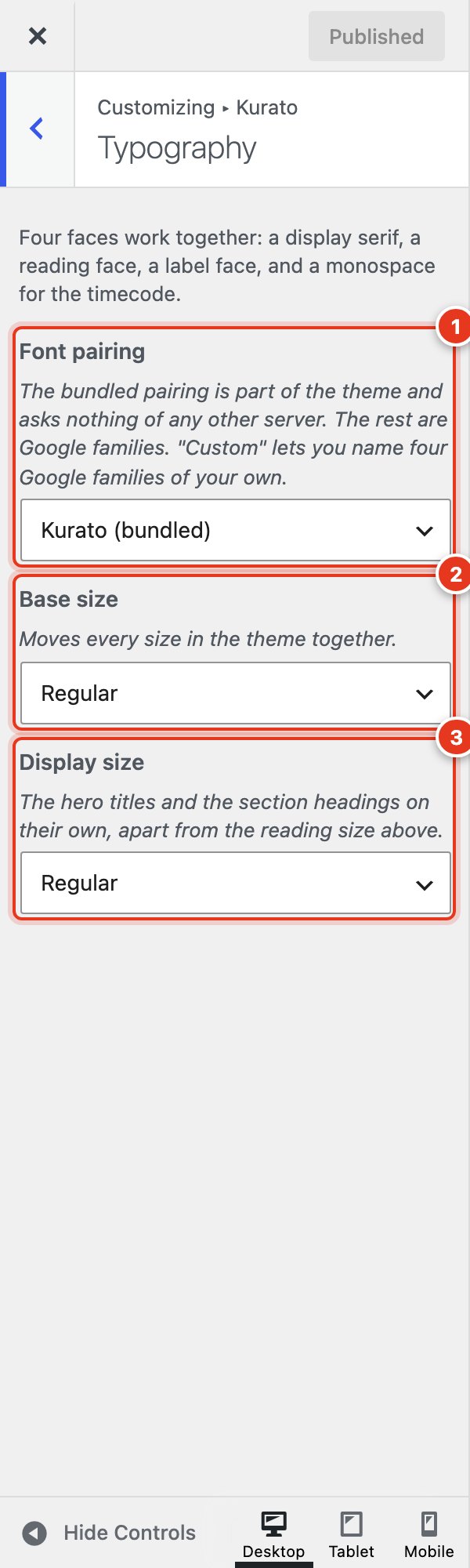
- Font pairing: the four fonts the theme uses.
- Base size: all text sizes together.
- Display size: only the large titles.
Kurato uses four fonts together: a display serif for titles, a reading font, a label font for small capitals and buttons, and a monospace font for the timecode.
| Setting | What it does | Default |
|---|---|---|
| Font pairing | Kurato (bundled): Cormorant Garamond, Crimson Pro, Kreon, and JetBrains Mono, served from your own site. Broadsheet: Spectral, Newsreader, Archivo, and IBM Plex Mono. Studio: Fraunces, Source Serif 4, Space Grotesk, and DM Mono. Gallery: Literata, Work Sans, Oswald, and Roboto Mono. Marquee: Faustina, Lora, Barlow Condensed, and Fira Code. Custom: four Google fonts you name. | Kurato (bundled) |
| Custom pairing fields | Shown only for Custom. Write each family name exactly as fonts.google.com writes it, for example Playfair Display. An empty field keeps the bundled font in that place. Only the regular style of each family is loaded. | Empty |
| Host Google fonts on this site | Shown for the Google pairings. Serves the fonts from your site instead of Google's. Download the pairing first on Kurato > Fonts. See Google fonts and privacy. | On |
| Base size | Small, Regular, or Large. Moves every text size together. | Regular |
| Display size | Compact, Regular, or Large. Changes only the hero titles and the section headings. | Regular |
Header#
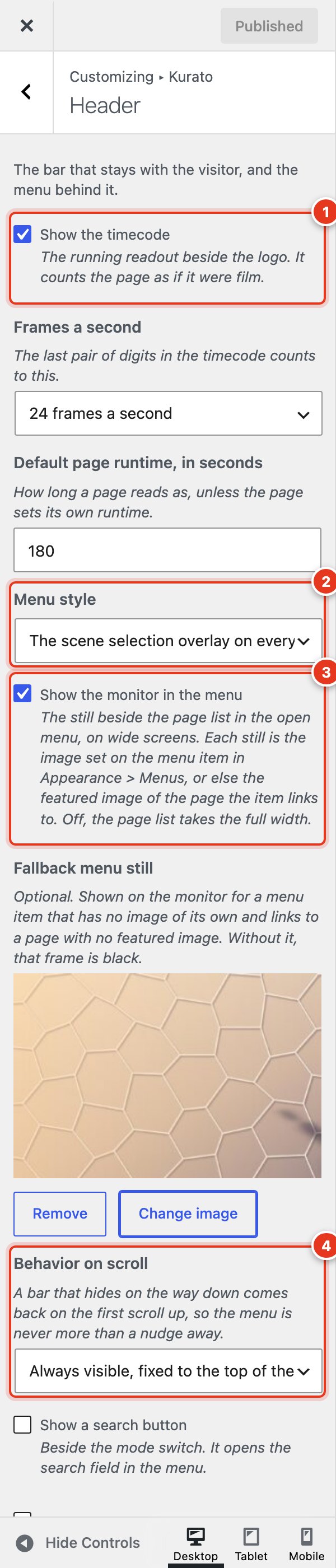
- The timecode beside the logo.
- How the menu opens.
- The image beside the menu.
- What the header does when the visitor scrolls.
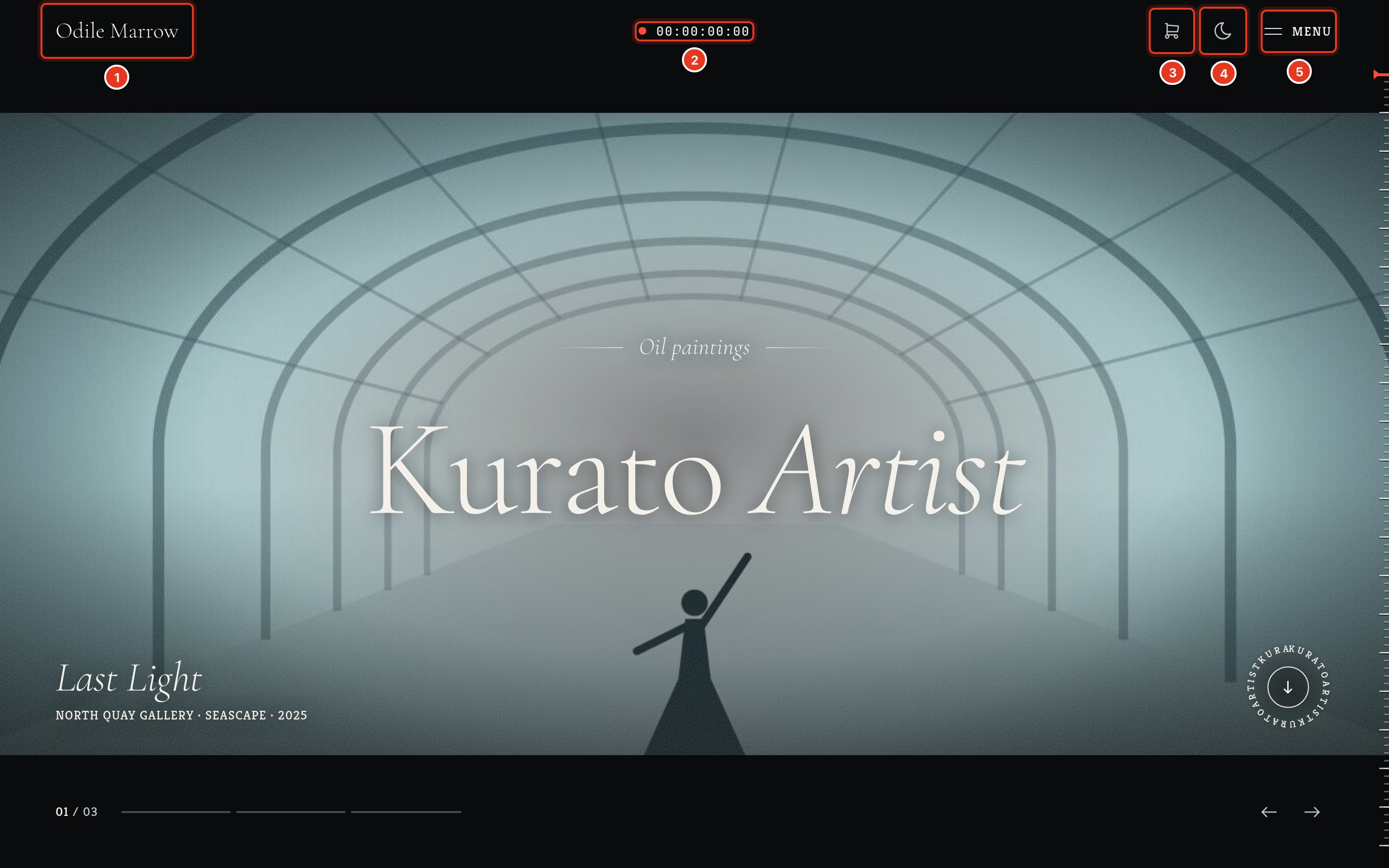
- Your logo, or the site title.
- The timecode. It counts as the visitor reads the page.
- The cart, when WooCommerce is active.
- The day and night button.
- The menu button.
| Setting | What it does | Default |
|---|---|---|
| Show the timecode | The running readout beside the logo. It counts the page as if it were film. | On |
| Frames a second | 24, 25, or 30. The last pair of digits in the timecode counts up to this number. | 24 |
| Default page runtime, in seconds | How long a page "runs" for the timecode, unless the page sets its own. See Options for one page. | 180 |
| Menu style | The full-screen menu on every screen, or inline links on wide screens with the full-screen menu behind the menu button. | Full-screen menu |
| Show the monitor in the menu | The image beside the list in the open menu, on wide screens. Turn it off and the list takes the full width. | On |
| Fallback menu still | Shown on the monitor for an item that has no image and links to a page without a featured image. Without it, that frame is black. | None |
| Behavior on scroll | Always visible; hides when scrolling down and returns on scrolling up; or scrolls away with the page. | Always visible |
| Show a search button | Beside the mode button. It opens the search field in the menu. | Off |
| Show breadcrumbs | A trail above the title of every page, post, project, and archive. Uses the Yoast SEO or Rank Math trail when one of them is active. | Off |
The open menu looks like this:
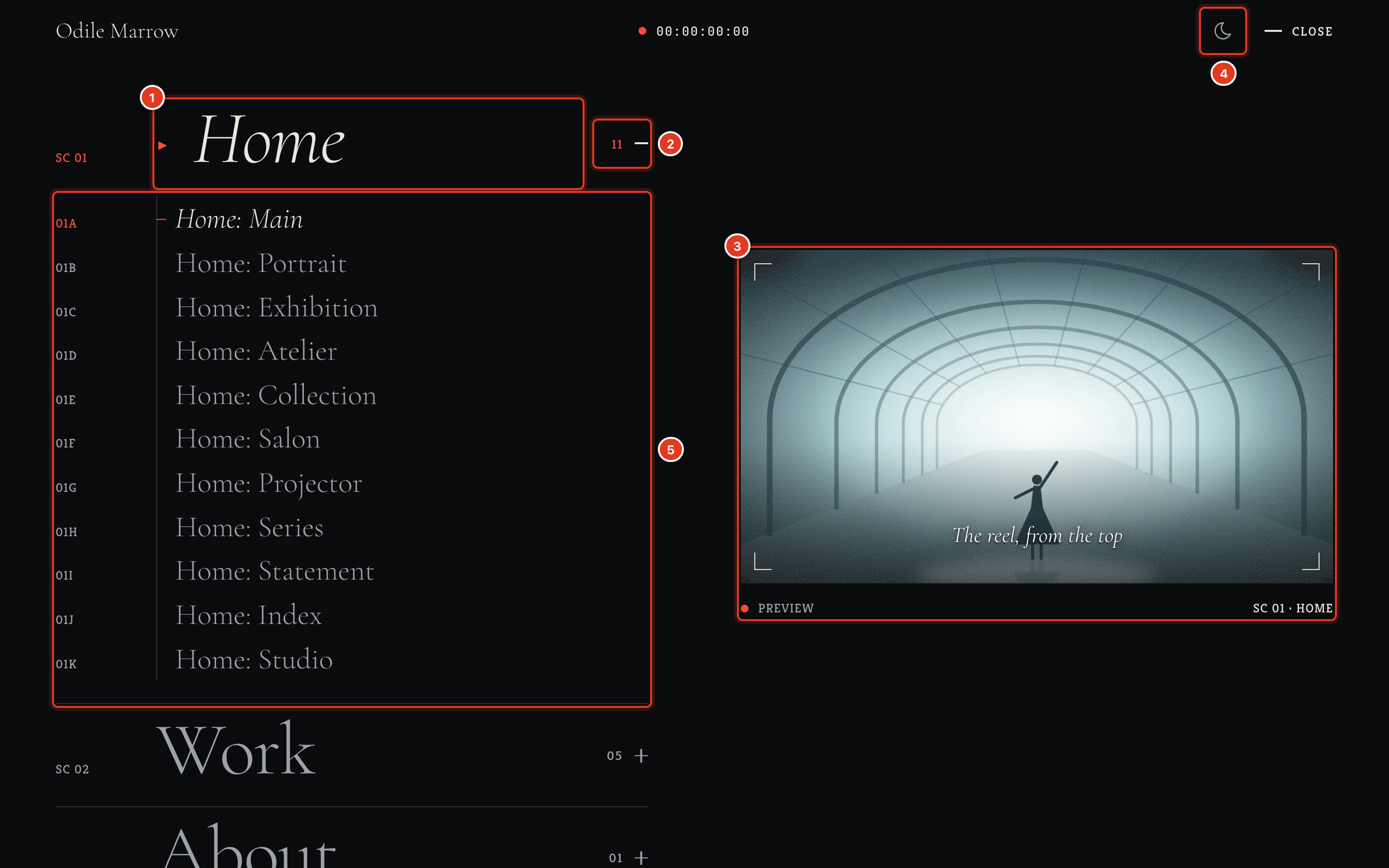
- A top-level menu item, numbered as a scene.
- The count of items under it, and the button that opens them.
- The monitor: the item's still, with the item's note on it.
- The day and night button.
- The items under it, numbered 01A, 01B, and so on.
Motion#
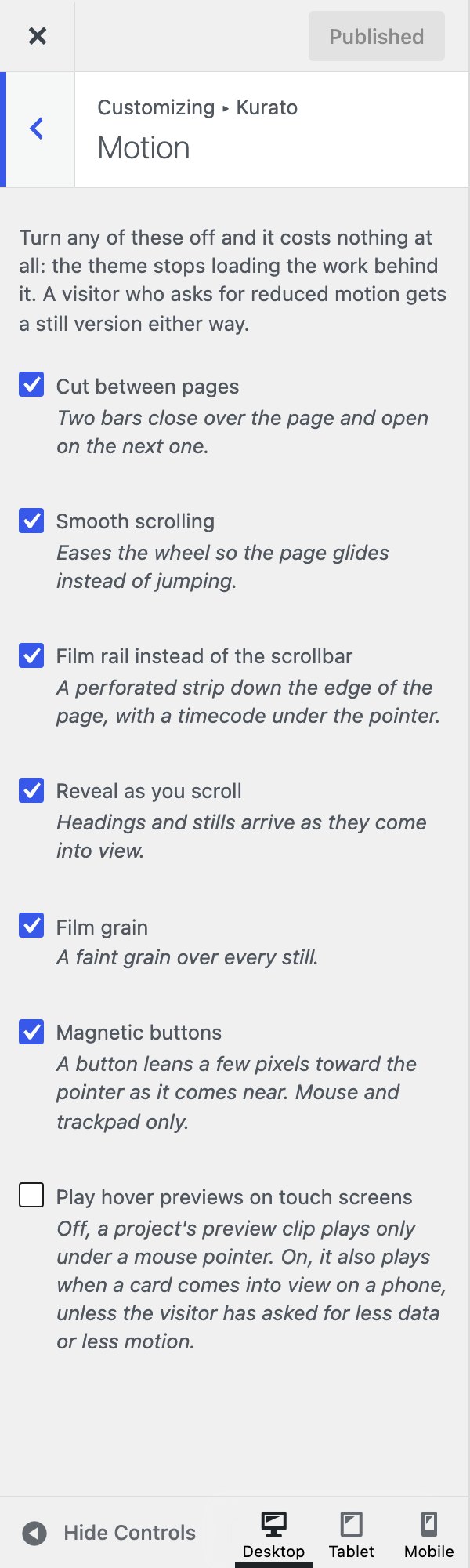
Each effect has its own switch. An effect you turn off costs nothing: the theme stops loading the code behind it. Visitors whose device asks for reduced motion always get a still version.
| Setting | Default |
|---|---|
| Cut between pages: two bars close over the page and open on the next one. | On |
| Smooth scrolling: the page glides instead of jumping. | On |
| Film rail instead of the scrollbar: a film strip down the edge of the page, with a timecode under the pointer. | On |
| Reveal as you scroll: headings and images appear as they come into view. | On |
| Film grain: a faint grain over every image. | On |
| Magnetic buttons: a button moves a few pixels toward the pointer. Mouse and trackpad only. | On |
| Play hover previews on touch screens: a project's preview clip also plays on phones when its card comes into view. | Off |
Projects#
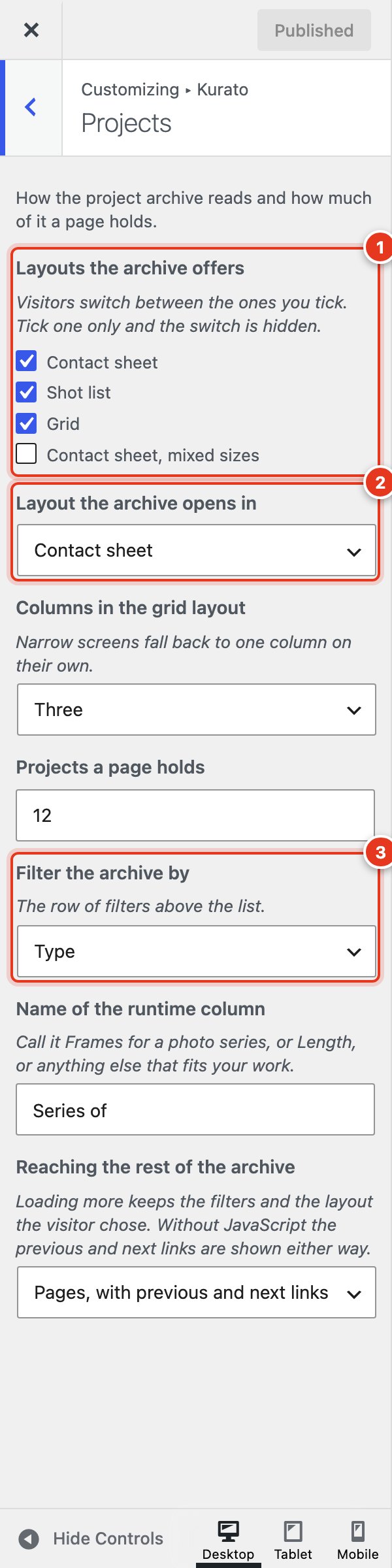
- The layouts visitors can switch between.
- The layout the archive opens in.
- The filters above the archive.
These settings change the project archive, the page that lists all your projects (for example /work/).
| Setting | What it does | Default |
|---|---|---|
| Layouts the archive offers | Contact sheet, Shot list, Grid, and Contact sheet with mixed sizes. Visitors switch between the ones you tick. Tick one and the switch is hidden. | Contact sheet, Shot list, Grid |
| Layout the archive opens in | One of the four layouts. | Contact sheet |
| Columns in the grid layout | Two, Three, or Four. Phones always show one column. | Three |
| Projects a page holds | 1 to 48. | 12 |
| Filter the archive by | Type, Client, Year, or No filters. | Type |
| Name of the runtime column | The label of the runtime column. For example, "Frames" for photo series or "Length" for films. | Runtime |
| Reaching the rest of the archive | Pages with previous and next links; a "load more" button; or loading more as the visitor scrolls. | Pages |
Blog#
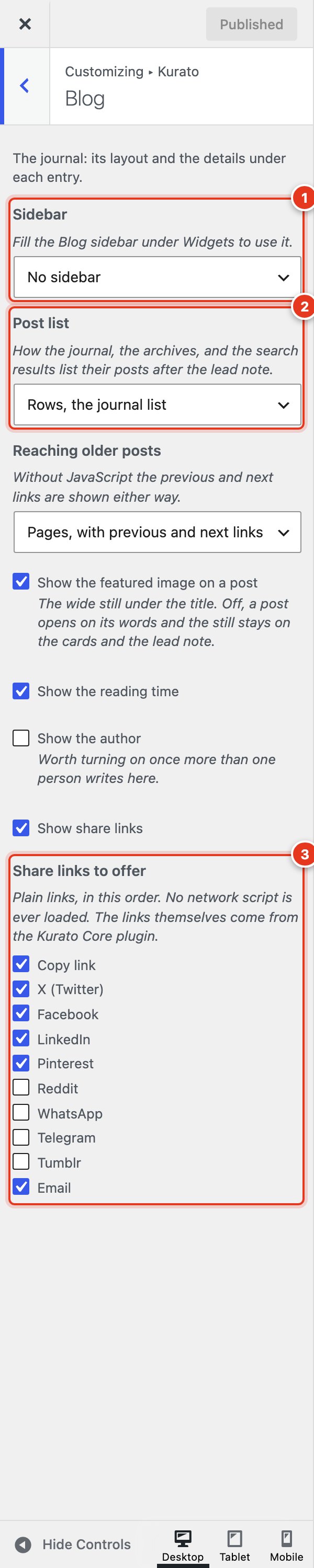
- The blog sidebar: none, right, or left.
- How the journal lists posts.
- The share links under each post.
| Setting | What it does | Default |
|---|---|---|
| Sidebar | No sidebar, on the right, or on the left. Fill the Blog sidebar under Appearance > Widgets to use it. | No sidebar |
| Post list | Rows (the journal list), or cards with an image, three across. | Rows |
| Reaching older posts | Pages, a "load more" button, or loading more as the visitor scrolls. | Pages |
| Show the featured image on a post | The wide image under the post title. | On |
| Show the reading time | An estimate in the meta line of each post. | On |
| Show the author | The author box under each post. Useful when more than one person writes. | Off |
| Show share links | Links to share the post. | On |
| Share links to offer | Copy link, X (Twitter), Facebook, LinkedIn, Pinterest, Reddit, WhatsApp, Telegram, Tumblr, and Email. These are plain links: no script from the networks is loaded. | Copy link, X, Facebook, LinkedIn, Pinterest, Email |
404 page#
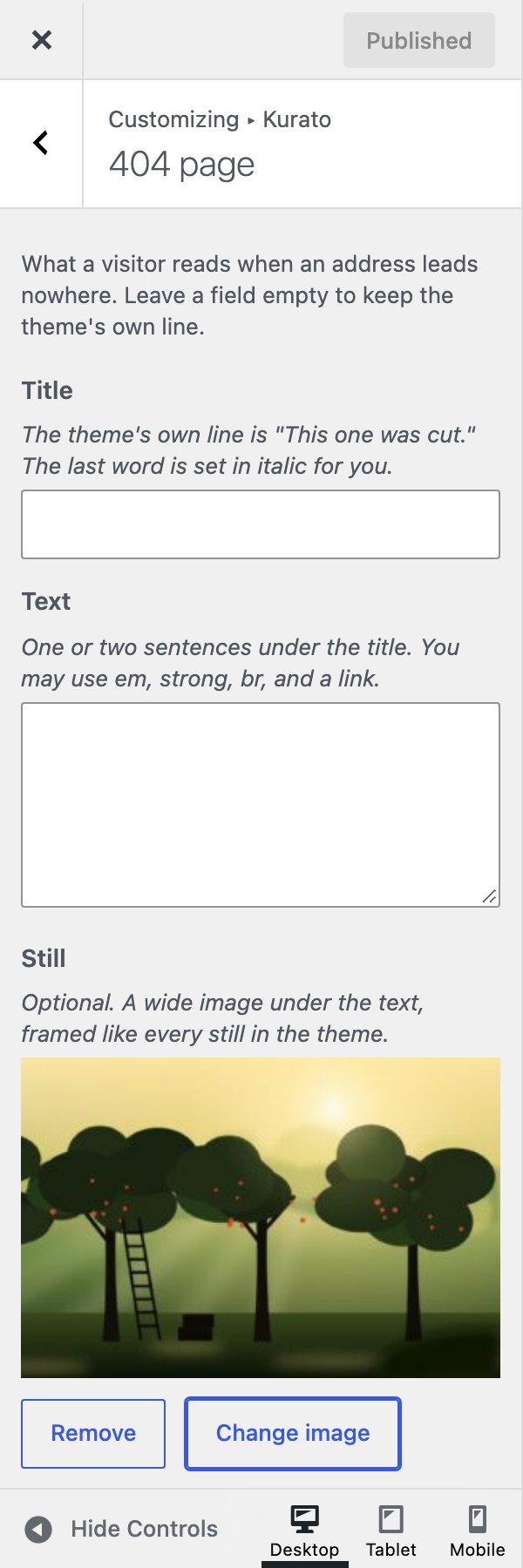
The page a visitor sees when an address leads nowhere. Leave a field empty to keep the theme's own text.
- Title: the theme's own title is "This one was cut." The last word is set in italic.
- Text: one or two sentences under the title. You can use
<em>,<strong>,<br>, and a link. - Still: an optional wide image under the text.
Footer#
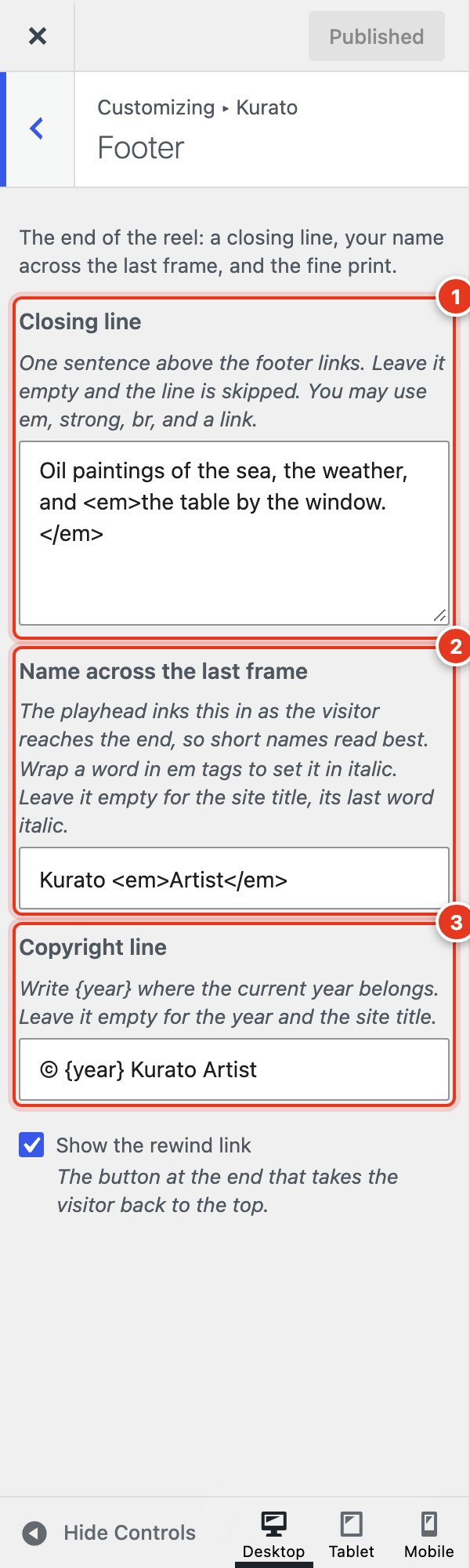
- Closing line: one sentence above the footer links. Leave it empty to skip it.
- Name across the last frame: the large name at the end of every page. The playhead writes it in as the visitor reaches the end. Short names read best. Wrap a word in
<em>and</em>to set it in italic. Leave it empty to use the site title. - Copyright line: write
{year}where the current year belongs. Leave it empty for the year and the site title.
Show the rewind link (on by default) adds a button at the end that takes the visitor back to the top.
Contact and social#
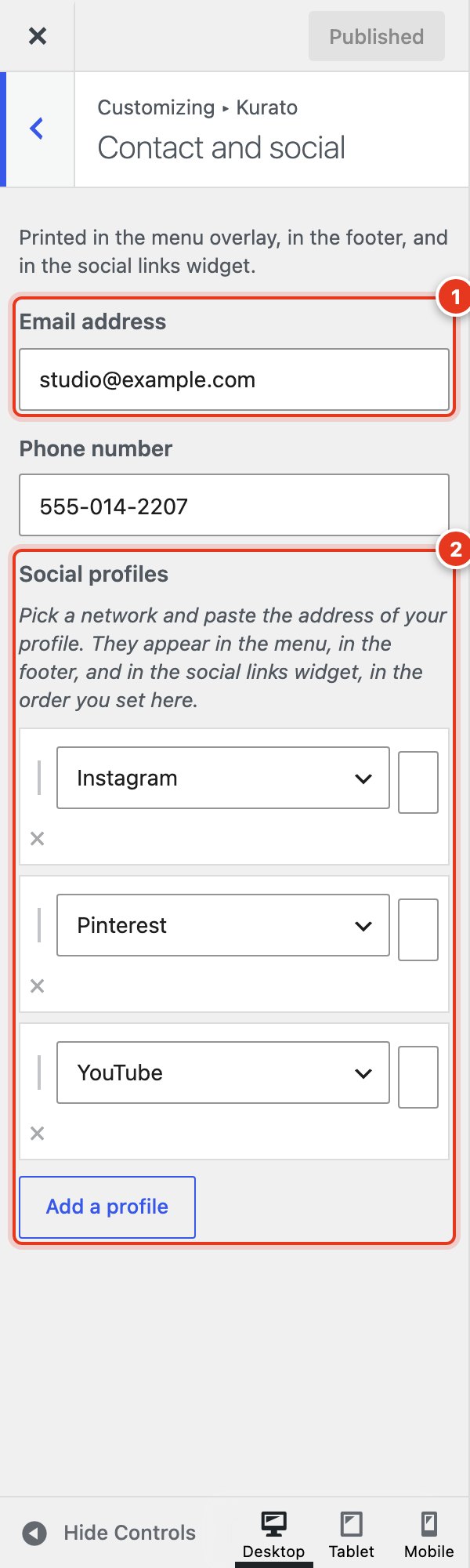
- Email address and Phone number: shown in the full-screen menu and the footer.
- Social profiles: click Add a profile, pick a network, and paste the address of your profile. They appear in the order you add them. To change the order, remove a profile and add it again./li>
The networks are Vimeo, YouTube, Instagram, Letterboxd, X (Twitter), Facebook, LinkedIn, Behance, Dribbble, TikTok, Pinterest, Flickr, 500px, GitHub, Mastodon, Threads, Bluesky, Tumblr, Email, and RSS. The profiles also fill the Kurato: Social links widget.
Shop#
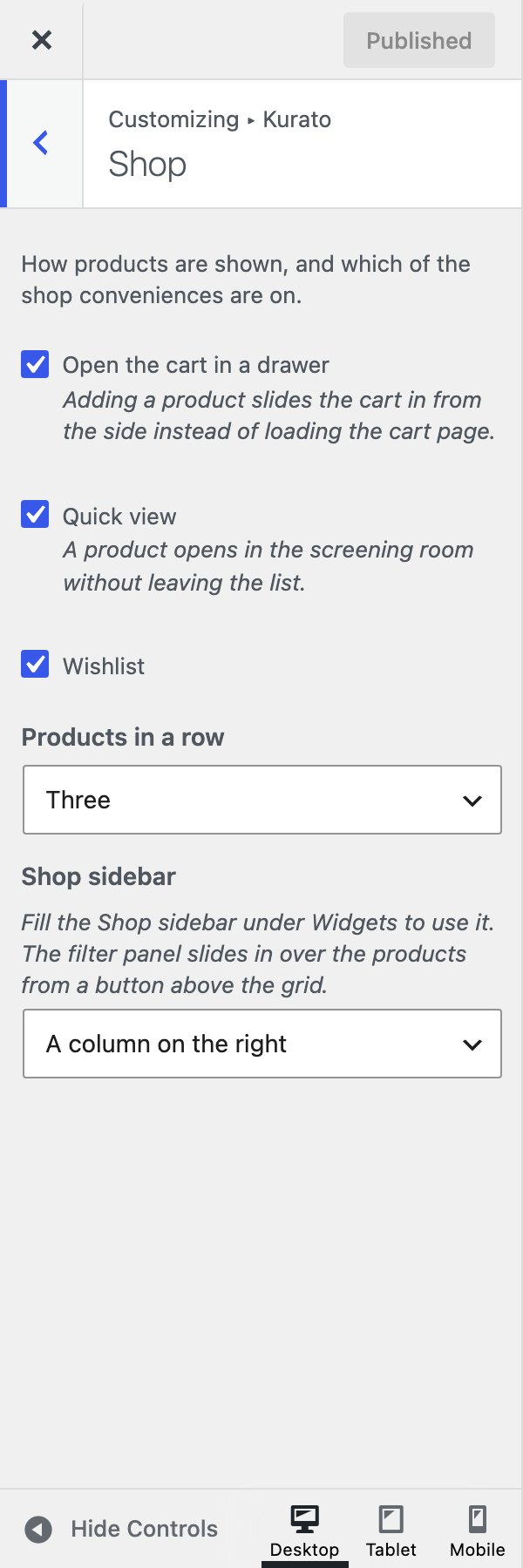
This section appears when WooCommerce is active.
| Setting | Default |
|---|---|
| Open the cart in a drawer: adding a product slides the cart in from the side. | On |
| Quick view: a product opens in a window over the list. | On |
| Wishlist: a heart on each product. | On |
| Products in a row: Two, Three, or Four. | Three |
| Shop sidebar: none, a column on the right or left, or a filter panel that slides in from the side. | A column on the right |
More about the shop is in Shop.
Kurato 1.0.0 documentation, updated 2026-10-03. Online at kurato.jawad.work/docs/.